Pop the hood: Trnl - A Lightweight HTTP Package
Premise
About six weeks ago, I started working on Trnl - a lightweight HTTP project written in Go. I’ve built plenty of HTTP servers and APIs before, but I realized I’d been relying heavily on frameworks that “make it work” with little understanding of how the frameworks APIs and routing I used every day works under the hood.
Trnl is my attempt to pop the hood. It’s been a hands-on way to dig into the networking layer, get more comfortable with transport protocols, and build out the core pieces of an HTTP server myself: from parsing requests and writing responses to designing a router that goes beyond simple static paths. Along the way, it’s also pushed me to implement and reason about more complex data structures in a real system.
I remember reading the second edition of The C Programming Language by Brian Kernighan and Dennis Ritchie about a year ago. Something that really stood out to me was how they explained the simple Hello, world! program we all know today. Prior to reading the book, I always thought of print functions in most languages as very trivial. Although they aren’t exactly complex, the book opened my eyes to how many steps are required to print a simple string such as hello, world. This includes compiling/interpreting text files, loading them, running them, and locating the object file. Of course, the vast majority of this process has been abstracted, but understanding the necessary steps required to print out a simple string of text made me realize just why something as trivial as printing hello, world has become a staple for introducing programmers to a new language.
To paraphrase the K&R, once these technical steps are mastered; even for such a simple concept, everything else required to write programs becomes easier. In homage to K&R, I’m starting this writing in a similar fashion. Many of you reading this have likely done some form of API development, and if you have, you have probably used tools such as Express.js or some other web framework, which means you have come across a function like listen() or listenAndServe(). Similar to the print function in most languages, the details that go behind theses calls are abstracted away from users, so they can feel trivial. However, they are in fact anything but trivial.
So, what actually happens when you call this function? Your OS does work in the background such as creating something known as a socket (don’t fret if this is new - I will revisit it soon), binding the port you provided to your server, setting up a listener for incoming client connections, accepting new connections, and then creating a channel to send and receive data between your client and your server. This heavy lifting is done by the collaboration between your framework/package and the OS, allowing you to focus on the application logic.
The outline for this writing is as follows:
- What exactly is HTTP?
- How the transport layer powers HTTP
- Building an HTTP Package
- Routing
- Going Dynamic (Beyond Static Routing)
- Limits and Tradeoffs
What exactly is HTTP?
According to MDN:
HTTP is an application-layer protocol for transmitting hypermedia documents, such as HTML. It was designed for communicating between web browsers and web servers, but can also be used for other purposes, such as machine-to-machine communication, programmatic access to APIs, and more.
Two phrases stand out to me in this definition: application-layer protocol and communication between web browsers and web servers. Chances are if you are reading this, you know what an application-layer protocol is, but if you aren’t, you are in luck.
The vast majority of what we do today as software engineers is built on the network stack, sometimes referred to as TCP/IP or the OSI Model. The OSI model is a conceptual framework for understanding networking layers, while TCP/IP is more of a practical, real-world implementation. The OSI model divides networking into seven conceptual layers, but for this article, we only need to focus on two: the Transport and Application layers.
Transport Layer: This layer is what powers web servers as we know them today, using Sockets. There are different types of sockets, but we are most concerned with IP Sockets, which can be classified into two types: TCP and UDP Sockets.
Application Layer: This is where we do most of our work as developers. We are not referring to applications in the modern sense (mobile and web apps); we are referring to the standards on which modern applications are built. Examples include HTTP, HTTPS, SSH, FTP, SMTP, and IMAP.
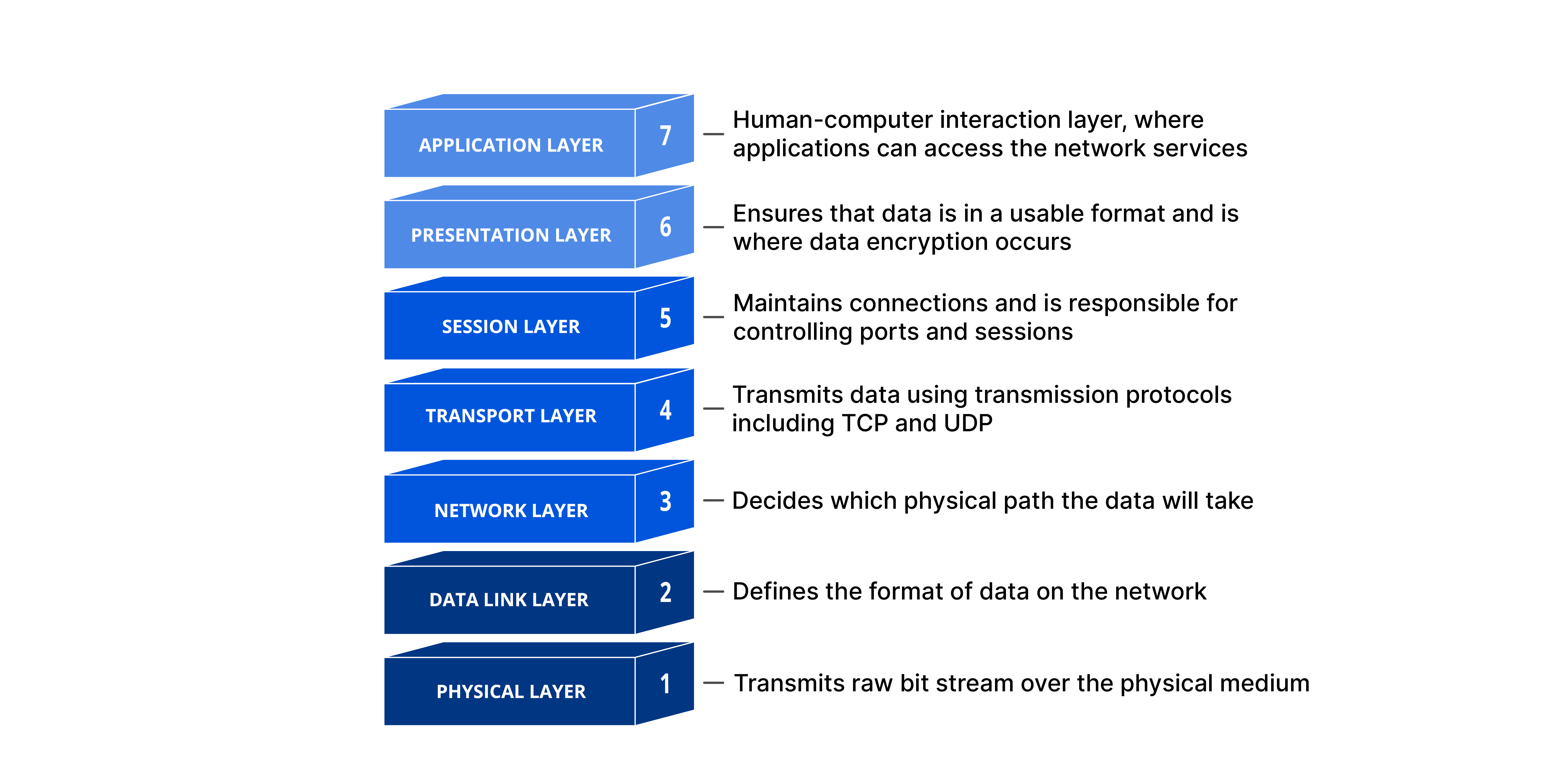 Source: Cloudflare
So now that you know what an application-layer protocol is, HTTP is a way to broker communication between a host device that provides a service and a host device that requests a service, using HTTP messages (a request-response feedback loop). HTTP usually runs on top of TCP (HTTP/1.1 and HTTP/2). HTTP/3 on the other hand, runs over QUIC, which uses UDP. For more on HTTP, see the MDN docs reference link below. If you remember nothing else from this section, remember this: HTTP defines the message format; TCP moves the bytes.
How Does the Transport Layer Power HTTP
The transport layer, as briefly explained above, uses IP sockets to power HTTP. But what exactly are sockets? A couple of years ago, I heard the saying “Everything in Linux is a file” and I took it at face value, assuming it meant everything in Linux is a literal file (a config, a file, a folder). But that is not exactly right — in Unix/Linux systems, a file is represented by an integer called a file descriptor, the file descriptor is what systems uses to write and read from a file, but the file descriptors are used by everything on the systems from devices (keyboard, mouse, microphones, speakers), to actual files, network connections (databases, cache, clients, servers), and even the terminal itself. To quote Beej:
A file descriptor is simply an integer associated with an open file.
Sockets
A socket, according to Wikipedia, is defined as follows:
A software structure within a network node that serves as an endpoint for sending and receiving data across the network.
In plain terms, a socket is a way for two programs (a client and server, in our case) to communicate with each other. In this article, I will mainly focus on one type of socket: IP Sockets, which are used to communicate between two programs over the Internet Protocol.
There are two types of IP sockets: TCP sockets (stream sockets) and UDP sockets (datagram sockets). HTTP/1.1 uses TCP, and because Trnl is an HTTP/1.1 implementation, we will focus mainly on TCP. TCP sockets are the primary socket type used in most API development today, since most APIs use HTTP/1.1 or HTTP/2. They are widely used because they are reliable and connection-oriented, which is why they are commnon in scenarios where reliability is very important. UDP, unlike TCP, isn’t as reliable because it’s connectionless, but it’s very performant.
Sockets provide interfaces to system calls that let us to create file descriptors in our programs, which other programs can use to establish communication channels. These APIs are essential because every HTTP library, package, or framework ultimately sits on top of these socket abstractions.
Building an HTTP Package
Different programming languages provide libraries that serve as APIs, allowing programmers to access socket system calls. In C, the <sys/socket.h> header file is the go-to. This library is great for learning networks from a low-level as it provides very little abstraction. The trade-off, however, is that you have to handle every minute setup detail yourself.
For this project, I chose the net package (the network package provided by the Go standard library). I chose it because it offers the right amount of low-level network abstraction while still providing me with a high-level interface.
So what do we need to build an HTTP Package? At a high-level, we need three major components to set up an HTTP Package:
- Listener: This is the simplest part. It initializes a TCP server interface that waits for incoming connections and accepts them.
- Parser: The server reads bytes from the incoming connection and parses them into our custom request type.
- Router: This routes requests to the functions that handle them.
These three components are need to create a simple HTTP package. Other features and middleware, such as logging and authentication, can also be added, but they are outside the scope of this project.
After setting up the listener, the server is ready to accept incoming connections. When a connection is established, a connection interface is provided. This connection interface is the implementation of the file descriptor I mentioned earlier. In that sense, the connection interface is the “file,” and it’s allows a server and a client to send and receive streams of data.
The connection interface is passed to the parser, which uses it while handling request/response data. You can’t load the connection into a response type directly, however, because the response needs metadata. Go provides a Writer interface that supports buffered input/output operations, enabling easy bidirectional data transfer between hosts. This connection interface can be wrapped around a buffered writer and supplied to response fields for delivering responses back to clients. With these two components working together, you now have a working package.
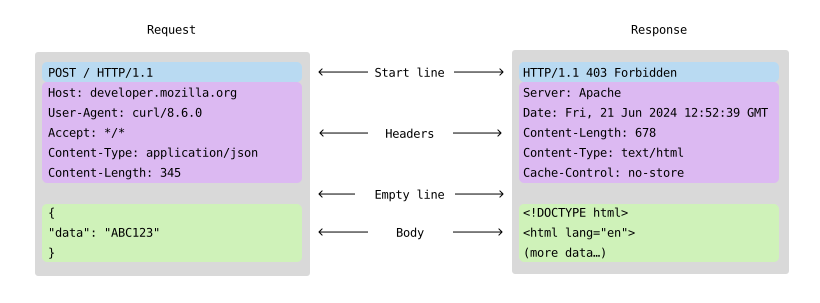 Source: MDN Web Docs
Let’s walk through a sample request:
GET /api/users/42 HTTP/1.1
The client initiates a TCP connection to the server. The server accepts the connection via Accept(). The server reads raw bytes from the socket. Parser converts bytes into a structured request object (header, metadata, body). Router matches /api/users/:id and extracts the id (42). The handler function generates and writes a Response. The response is encoded in HTTP format and written to the client over a TCP connection.
func (s *Server) ListenAndServe() error {
	//...

	list, err := net.Listen("tcp", port)
	if err != nil {
		return err
	}
	defer list.Close()

	return s.Serve(list)
}

/*
 * Serves using a net.Listener interface as parameter
 */
func (s *Server) Serve(l net.Listener) error {
	for {
		conn, err := l.Accept()
		if err != nil {
			return err
		}

		//...

		go s.handleConnection(conn)
	}
}

/*
 * Handle connections on listeners. Respond with bad request if error
 * is encoutered while parsing. Else, serve request if valid
 */
func (s *Server) handleConnection(conn net.Conn) {
	defer conn.Close()

	res := &response{
		conn:    conn,
		writer:  bufio.NewWriter(conn),
		header:  make(Header),
		protVer: "HTTP/1.1",
	}

	req, err := parseRequest(conn)
	//...

	res.header.Set("location", req.Header.Path)
	s.Handler.ServeHTTP(res, req)
	res.Flush()
}
How About Routing?
At this point, you have a semi-functional package - you can receive requests and send responses. But what good is an HTTP package without routing?
The simplest way to implement a router is to use a hash map. It is very efficient because hash maps offer O(1) lookup time complexity, allowing routes to be retrieved quickly when clients make requests. So you can implement one with the snippet below.
type Router struct {
 routes map[routeKey]Handler
}
In the snippet above, routeKey is a type with two fields: the HTTP method and the path. The routeKey maps to a Handler type, which is just a type for handler/callback functions. You can also simplify this by concatenating the HTTP method and path into one single string.
But while hash maps are excellent for exact matches, they don’t naturally support dynamic segments such as /api/users/:id without more complex parsing logic. So, what data structure that is flexible enough for this use case but while still being fast enough to avoid performance overhead?
Going Dynamic (Beyond Static Routing)
If you guessed tries, you would be right. If you’ve taken any data structures and algorithms course or praticed LeetCode, you have likely come across tries.
Tries are a tree-based data structure used primarily to store and retrieve a dynamic set of strings. Tries Wikipedia
In this section, we will cover a special type of tries called radix tries, which are a class of prefix tries. Prefix tries are a kind of tree structure used in storing strings, especially when we need distinct strings. They work well because the allow shared prefixes, such as point and pointer, to be reused.
For example, if you want to store a word point, you can insert it into the trie and denote t as the end of the word. If you later insert the word pointer, you reuse the shared prefix up to t and then add characters e and r, marking r as the end of the word pointer. This enables storing many strings with fewer duplicates. Prefix Tries are usually implemented as below.
type Node struct {
 children map[string]*Node
 endOfWord bool
}

type Trie struct {
 root *Node
}
 Source: University of Wisconsin-Madison
A standard prefix trie stores one character per node. In routing, however, our segments are already in meaningful units such as (api, users, :id). A radix trie compresses common prefixes into single nodes, reducing memory overhead and traversal cost. With a Radix trie, we can easily identify whether routes are dynamic or static by iterating over subpaths and the trie in a single pass. During traversal, we check whether each subpath exists as a node in the trie; if not, we check for a dynamic-parameter child node. If a dynamic parameter exists, we can conclude that the child is a dynamic route; otherwise, the path is unregistered path.
The advantage of radix tries is that there is no separate performance overhead for static versus dynamic routes; they both perform similarly. The time complexity is O(k), where k is the number of path segments in a given route. Therefore, in the endpoint /api/users, k = 2, and in /api/users/:id, k = 3.
See below for the radix trie implementation for Trnl; the fields parameter is added to store params such as id. A parameter retrieval method is provided for retrieving parameters along a dynamic route, encapsulating the trie from users.
type rNode struct {
 children     map[string]*rNode  // Map subpath string to children node
 handlers     map[string]Handler // Map HTTP methods to handler functions
 dynamicRoute bool
 param        string
 endOfPath    bool
}

// Mux is the radix trie
type Mux struct {
 root *rNode
}

// Return value for matchRoute
type routeMatch struct {
 handler    Handler
 params     map[string]string
 hasParams  bool
 pathExists bool
}
 Source: Wikipedia
The time and space optimizations of tries (specifically radix tries) make them ideal for HTTP Package routing and IP Address routing at the Network Layer.
Limits and Tradeoffs
Trnl is not production-ready. It still lacks features such as:
- Client Interface: The Trnl README currently only provides examples for an HTTP server, because Trnl doesn’t yet include a client interface at the moment.
- Context: The current Trnl implementation doesn’t provide request context. Contexts are important because they carry request state. This is especially useful during network interruption so databases don’t commit transactions from an interrupted request.
- Query Parameters: There are currently no query parameter features. A request like
/api/users?sort=ascwould lose thesortparameter.
If you made it this far, I’m extremely grateful you took the time to read this article. I hope you have learned something from this article. See you on the next one.
Check out the package repo here - Trnl GitHub Repo
References
- Beej’s Guide to Network Programming - BGNET
- TCP/IP Illustrated - TCP/IP Illustrated
- MDN Docs - MDN HTTP
- Neetcode - Trees & Prefix Trees
- Radix Trees - LWN.net
- Wikipedia - Radix Trees